plugin manager · original OP-1 · firmware 246
Pick your mods.
Opus 1 was a pack. Opus 2 is the loader: a small core, and every feature a plugin file you copy onto the OP-1's disk. Add one, remove one, swap them. No reflashing.
opus 2 · public beta 3.2 ·what's new
How it works
Opus 2 is a small core that lives in the firmware, and plugins that live on the OP-1's disk. The core owns every hook into the OS and hands each plugin the services it asks for: effects, engines, pages, settings, storage. A plugin never patches the firmware on its own.
1.1A plugin is a file
Copy a .opmod file into the disk's mods folder. At the next start the core reads each file's description, checks it and loads it, and the menu's mods page lists it with its CPU and memory. Take the file out and it's gone, with nothing left behind in the firmware. There's no set number of engines, effects or sequencers: memory is the only limit, and the whole starter pack, loaded, takes 1.28 MB of the plugins' 6 MB.
1.2Every plugin on a budget
The OP-1 makes its sound in blocks, and each block has 580,525 CPU cycles to share. The core times every plugin's audio work in every block and keeps its worst one, so you can see what a plugin costs before it costs you a glitch. The pack's heaviest plugins, by their worst block:
Measured in an emulator running the OP-1's own firmware, with its cache timing. On the developer's OP-1, dx's worst block came out at 93k cycles against the emulator's 84k.
1.3Any plugin can be a manager
A plugin can provide types of module: effects, engines and sequencers for now, LFOs later. Any plugin may run effects too, so an effect you download works everywhere effects go: in the OP-1's own effect slots, and in every plugin that runs effects, without its author ever knowing. Fx overdrive is the first such manager: it runs a second effect behind every sound's and the master's.
1.4Checked, never forced
Before a plugin changes a place in the firmware, the core checks the place is still stock, and a place holds one plugin. When two plugins want the same place or the same keys, the one later by file name is refused, and the mods list says which plugin has them, before anything breaks. So is a plugin that needs another one, a library, that's missing or too old. A plugin that crashes the OP-1 is left out at the next start, and one that takes far more CPU than it should is switched off. Whatever the reason a plugin wasn't installed or didn't load, the OP-1 says which one and why. Hold stop while switching on to start without any.
1.5Where stock features live
Effects sit in the OS's effect list and engines in its engine list, each with its own pages and a shift layer, drawn by the OS's own renderer. Nothing hides in a menu of its own unless it has to.
1.6Your sounds stay
A sound that needs a plugin you've removed is kept exactly as it is, and the OP-1 tells you which plugin it needs. Put the plugin back and it plays again. Sounds saved with Opus 1 carry over.
The starter pack
Every Opus 1 feature, rebuilt as a plugin, and four new ones. Take them all, or only the ones you want: each is one file.
Look at each plugin's keys page. A card shows a plugin's main keys; the OP-1 shows all of them. Open Opus's menu (synth drum tape mixer together), T2 for the mods, select a plugin with and push : its keys page lists every key, encoder and FN combination it uses and what each one does. Where that push is grey, the plugin adds no keys of its own, and an effect's or engine's controls are on its page.
2.1New in Opus 2
2.2Opus 1, as plugins
2.3New in the core
Diagnostics
A task manager on the menu's T3. Processes lists the audio, every plugin, the core and each of the OS's threads with their CPU and memory. Performance draws the audio's load over the last minute, with its worst block and the blocks that came late (the crackles), memory maps the OP-1's 64 MB, and system shows the battery, uptime and build. It only measures while it's on screen.
Voices
The system menu sets how many voices the synth plays, 1 to 6, and how many the unison mode stacks. Fewer voices leave more CPU for heavy engines and effects.
Date and time
The OP-1's own clock screen has a row in the system menu now. Stock opened it with shift + help, and help is Opus's FN key: hold it for a plugin's extra controls.
Sampling for engines
A plugin engine built for it samples like the stock sampler: mic or shift + mic, and a held note records into the slot while the sound stays the plugin's. The sample is saved with presets, and the engine list shows the sampler's samples as a column for it.
Told, not silent
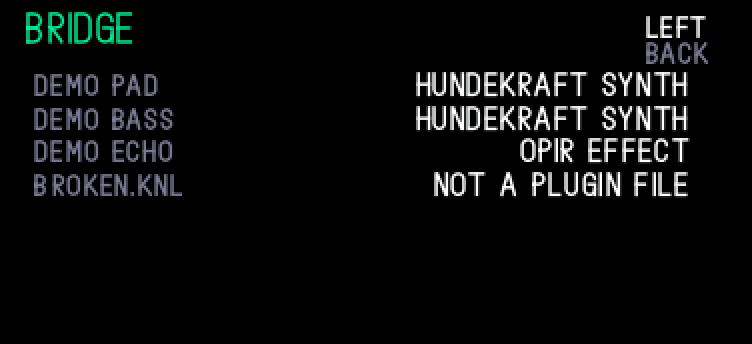
A file the OP-1 couldn't take is named right after disk mode, with the reason: not a plugin file, a file for the bridge's folder, too large, no room on the flash. A plugin that didn't load is named at the next start, and the mods list keeps it in red with why.
Start bar
A progress bar across the top of the start-up picture, on all three OP-1 screen types. start bar in the system menu switches it off.
2.4Fixed in the stock OS
Bugs in TE's own firmware that the core fixes, with or without plugins. Each was found and checked in an emulator running the OP-1's own firmware.
- The USB disk on Windows. Stock's USB code went deaf after a computer reset the connection or woke it from power saving, and Explorer froze on the OP-1's folders until the cable came out. Opus 2 sets the connection up again in a fraction of a second. USB MIDI too.
- Recording wore out good flash. Stock wrote the tape from a buffer the recording kept filling, so the flash's check after each write failed and good blocks were marked bad for good. Opus writes from a copy, and the storage page (menu, T4) now counts the flash's dead blocks. Credit to op1r, whose release notes also pointed at it.
- Saves cut off by a crash, stop or the power switch are undone at the next start, not left half done.
- Out of memory in long sessions. The sound database has twice stock's memory; big preset lists used to fill it until the OP-1 stopped.
- A large shape on the screen no longer stops the OP-1 when the next one is drawn.
- Keys pressed while disk mode starts on a nearly full flash no longer stop the OP-1.
- From Opus 1: disk mode no longer leaks a file handle for every sampler preset, or moves on into never-written flash every session.
Install
Two parts: the core, made in your browser from your own copy of TE's firmware 246 and installed like any OP-1 update, and the plugins, copied onto the OP-1's disk. Recovery, te-boot, is never changed, so the way back is always there.
3.1The core
- Back up first: in disk mode (shift + com, then T3) copy your tape, synth and drum folders to a computer.
- Make the update in the patcher, from your own
op1_246.op1. It runs in your browser; nothing is uploaded. - Switch the OP-1 off, hold com and switch it on. Press 1 (upload firmware) in the TE-BOOT menu, never 7 or 8, which erase.
- Connect it, copy the update onto the OP-1 disk and eject it. The OP-1 installs it and restarts. It goes over stock, Opus 1, op1r or Hundekraft, and your sounds, presets and tape stay.
3.2The plugins
- Download the starter pack from GitHub, or single plugins from their cards' info, and unzip it.
- Put the OP-1 in disk mode (shift + com, then T3) and drag the pack's
modsfolder onto the disk. It merges with the one there. - Eject the OP-1 disk on your computer: the OP-1 leaves disk mode and loads the plugins at its next start. Don't switch it off or unplug it while it's still in disk mode, or the files are lost. Opus's menu (synth drum tape mixer together) lists them on T2.
3.3Current version
opus 2 beta 3.2 beta
- core
- · 2026-10-30
- update file
- SHA-256
- made from
- op1_246.op1 (#246), your own copy
- plugins
- 21 in the starter pack:
- its SHA-256
3.4Add, remove, swap
A plugin in mods is installed; take it out and it's gone at the next start. Updating one is replacing its file. On the mods page, push for a plugin's settings, for its keys, for its info. The keys page is worth a look for every plugin that has one: it shows how the plugin does things. A sound whose plugin is gone shows "needs" and its name, and plays again once it's back.
3.5Back to stock
Opus's menu, T1, the cleaner: turn to ask for a clean and switch the OP-1 off and on. Your data is then ready for stock or op1r, and Opus keeps a copy of what it changed. Install TE's firmware the same way you installed Opus.
3.6Back to Opus 1
No cleaner needed: install Opus 1 from its patcher and it starts on Opus 2's sounds, keeping every one. Its own settings, such as colours, start at their defaults.
3.7Where new engines are
A plugin's engine joins the OP-1's own engine list: on synth, shift + T1, and turn through it. Its effects join the effect list the same way. The mods page (Opus's menu: synth drum tape mixer together, then T2) lists every plugin that loaded, and the OP-1 tells you when one wasn't installed, and why.
3.8Help is FN
Opus 2 makes the help key its FN key: hold it for a plugin's extra controls (its keys page lists them). So stock's help and its battery lights aren't there in the beta. The battery level is in diagnostics (Opus's menu, T3, the system tab), and the clock has a row in the system menu.
3.9Settings stay set
A plugin's settings are kept through a restart, so what you switch on stays on until you switch it off. They're on the mods page: select the plugin with and push . How each plugin works, its quick pages and the files it reads are in its info, on its card.
The bridge
Coming from op1r or Hundekraft? The bridge runs their synth engines, effects and sequencers on Opus 2 as they are, with their own screens and pages, and the sounds you saved with them play. It's a download of its own, not part of the starter pack.
An unstable alpha: expect it to break now and then. It lets you bring what you have, but Opus's own plugins run much better on Opus 2. They're made for its core (its CPU budget and measurements, its memory, settings and pages), while a bridged plugin runs through a layer that stands in for the firmware it was written for.
4.1Bring your plugins
- Install Opus 2 as in 3.1. Your sounds, presets and tape stay, and so do the plugin files op1r or Hundekraft put on the OP-1.
- Download
bridge.opmodand copy it into the disk'smodsfolder, next to the starter pack's. - Plugin files you download later (
.op1p,.knl) go intomods/bridge. - On the mods page, push on the bridge's row: it lists every file it found, what loaded and why a file didn't.
4.2What it runs
op1r's synth engines, effects and sequencers (.op1p) and Hundekraft's (.knl), in the OP-1's engine, effect and sequencer lists. The sequencers (since bridge 0.8.0): op1r's chord, dots, euclid, grids, oracle and peal, Hundekraft's c64arp, dots, euclid, oracle and peal, on shift + the sequencer key, their patterns saved. Since 0.9.0 there's no set number of files. Tested in the emulator with op1r 45's eight synths and two of its effects and with every Hundekraft 3 effect and sequencer, and on the developer's OP-1 with Hundekraft synths, an op1r effect and the sequencers.
4.3The download
bridge alpha
- file
- memory
- cpu
- the plugins it runs, measured like any other
- SHA-256
4.4Not bridged yet
LFOs (Hundekraft's quad) and the other features (chord and scale modes, midiseq), drum and sampler engines, and engines that play samples: they need their own firmware's core. Not every sound from another firmware will play. A drum kit made with Hundekraft's own drum engines (gin, drum+) plays as the OP-1's own drum kit, and the OP-1 says which engine it needs.
4.5Names and CPU
A plugin whose name is taken, by one of Opus's own or by the same plugin from the other firmware, isn't loaded, and the bridge's list says so. The bridge's CPU on the mods page is the plugins it runs: a heavy synth in chords with heavy effects can leave the OP-1 short.
4.6The way back
Still the cleaner, bridge or not (3.5): it makes your data ready for stock or op1r.
op1r is by popcorp and Hundekraft's firmware by Hundekraft. Every bridged plugin stays its author's work.
Beta
Opus 2 runs on the developer's own OP-1 every day, but a beta is where it meets everyone else's. It stays a beta until it has run long enough, on enough OP-1s, without trouble.
5.1Found a bug?
Report it on GitHub, with the core's build and the plugin list from the mods page, what you pressed and what happened. A photo of the screen helps. If the OP-1 crashed, attach the crash log: in disk mode, the crash folder, the newest N.txt.
5.2Known issues
With a colour theme, the dim edges of text in a colour other than green can look green on the OP-1's screen. TE's own screens show it too: it's the panel, not Opus. With USB plugged in, holding stop at power-on makes the logo take longer. In the bridge, an alpha: a bridged effect's settings can be pulled into the OS filter's range when a sound loads or its knob turns (no crash), and a colour theme misses some shades on bridged plugins' pages (a plugin ported to Opus 2 takes the theme in full). A downloaded engine that plays the slot's sample stays silent after a restart until it's rebuilt for the core's sampler service. Nothing else known.
5.3Making plugins
The plugin kit is on GitHub: guides and the full API reference, the SDK headers, the build tool, four example plugins (bitcrush, zoom, halloween and outatime) and instructions any AI agent can follow, all GPL-3.0. With it comes the core's developer mode (in the system menu, off by default); the emulator and the dev port's tools come after the beta. The core's and the other plugins' source isn't out yet. It will be, once the code is properly put together: there's no date, but it isn't meant to stay closed. Plugin ideas are welcome in Discussions and on op-forums, and the mod registry keeps the names and numbers mods share.